A workout log that keeps up with your sets.
Pick exercises from a library of 800, log weight and reps as you go, and let Bravel handle the rest timer, your last numbers and every new personal record.
How it works
Log every set in a couple of taps
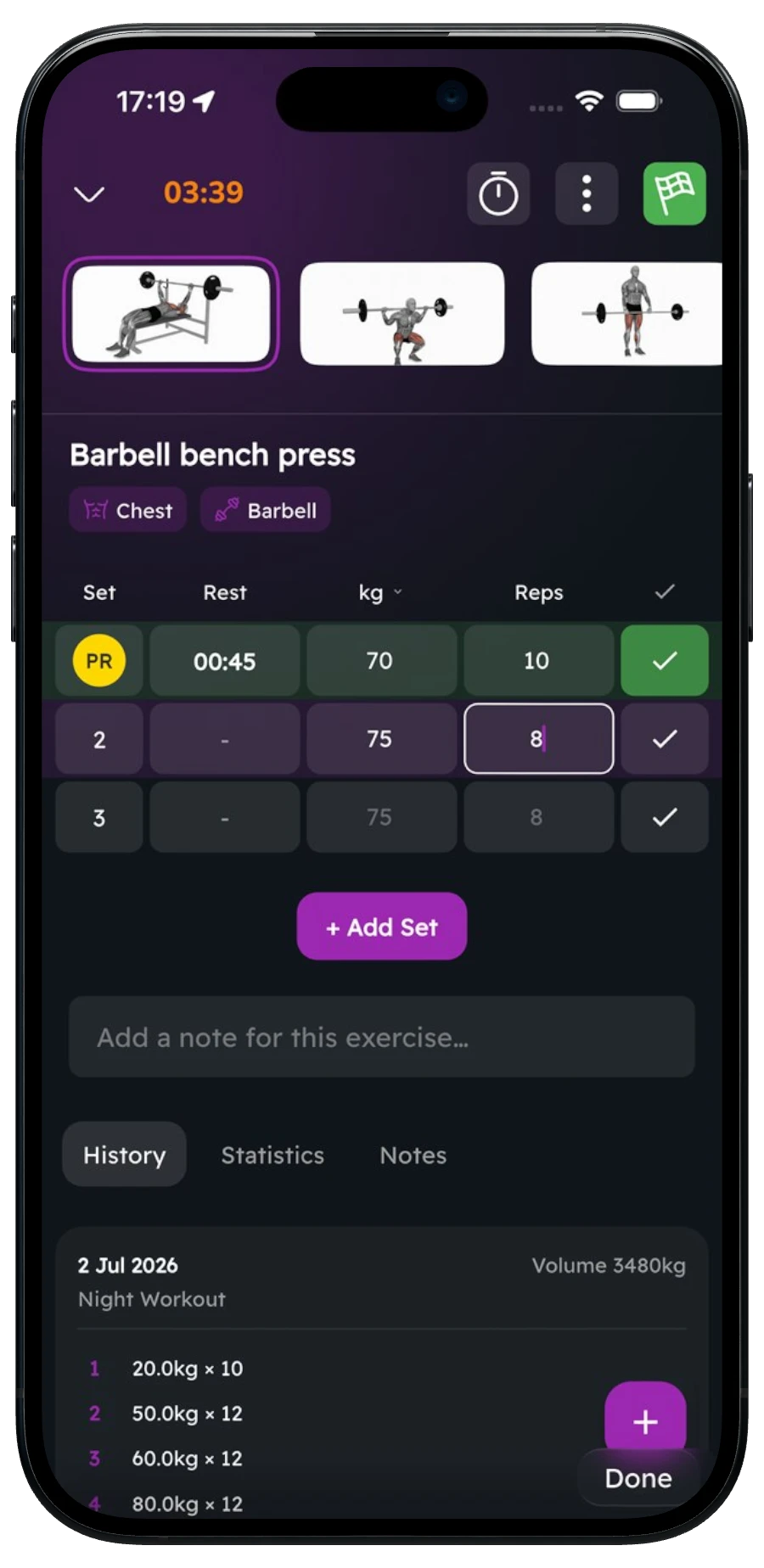
Add exercises, tick sets off as you finish them and adjust weight and reps on the spot. The columns match the exercise, so a plank asks for time and a run asks for distance and time.
- Four set types: normal, warm-up, drop set and failure
- Weight and reps, reps only, time only, or distance and time
- Switch between kg and lbs, or km and miles, right from the set header
Your last session, already filled in
Each set shows what you did last time as a hint, so you always know the number to beat. Trying an exercise for the first time? Bravel suggests a starting weight based on your body weight.
A rest timer that starts itself
Give a set a rest time and the countdown starts the moment you tick it off. Add or take away 15 seconds as you go; if you switch apps, a notification tells you when it’s time for the next set.
- Rest set per set, in 5-second steps up to 10 minutes
- Sound and background notification when rest is up
- Supersets you can name, with their own rest
- On iPhone, the workout shows on the Lock Screen and in the Dynamic Island
PRs the second they happen
Beat your best and the set gets a PR badge right away. Bravel tracks records for weight, reps, estimated one-rep max and volume, and every exercise has a history and a strength-progress chart.
Templates, plans and a proper finish
Save any workout as a template, schedule it on the calendar or share it with a code. When you finish, you get a summary of time, sets and total volume, ready to share to your Instagram Story.
- Create, edit and duplicate your own templates
- Ready-made plans and guided workouts in Explore
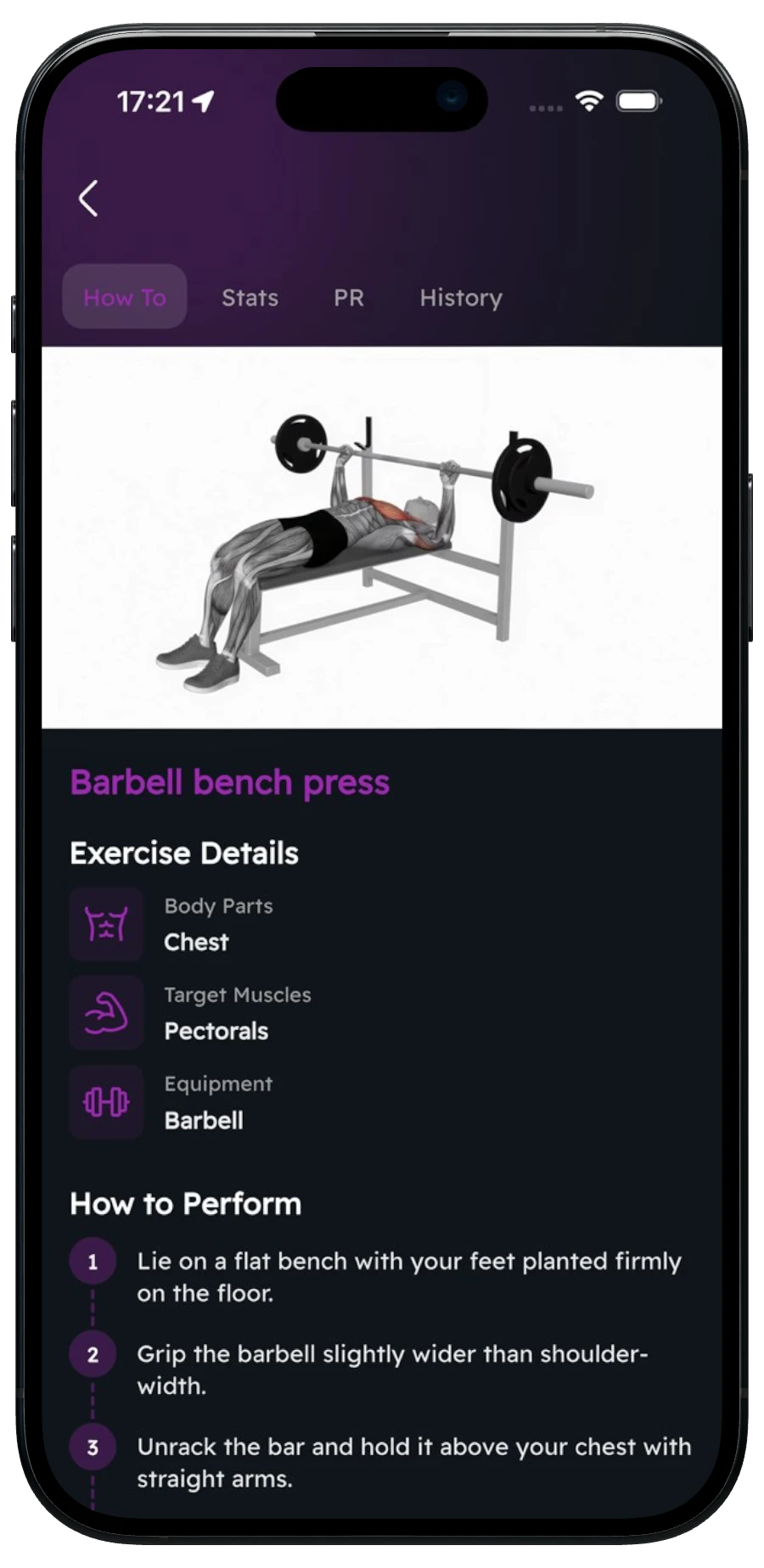
- 800 exercises with target muscles, equipment and step-by-step instructions
Who it's for
- Lifters who want a fast, clean log without a spreadsheet
- Beginners who need to know what weight to start with and how to do each move
- Anyone who trains with supersets, drop sets or a strict rest timer
- People mixing gym sessions with runs and walks in one calendar
FAQ
Which set types can I log?
Normal, warm-up, drop and failure sets. Exercises log weight and reps, reps only, time only, or distance and time, depending on the movement.
Does Bravel have a rest timer?
Yes. Set a rest time on a set and the timer starts automatically when you tick it off. You can add or remove 15 seconds, and you get a notification if the app is in the background.
How many exercises are in the library?
800, each with target and secondary muscles, the equipment it needs and step-by-step instructions, most with a how-to video. You can also add your own exercises.
Can I reuse my workouts?
Yes. Save any workout as a template, edit or duplicate it, put it on your calendar, or share it with a friend using a share code.
Does it work in kilograms and pounds?
Both. You can switch between kg and lbs, and between kilometres and miles, while you log.
Free guides & tools
More in Bravel
- NutritionCalories, protein, fat, carbs and water against targets built from your body and goal.
- AI CoachSpiro builds workouts and meal plans and answers your training questions — by voice or text.
- TrackerSteps, calories, water, GPS walks and runs, streaks and training volume in one place.
- Food ScannerScan a barcode or snap a photo of your plate — calories and macros logged in seconds.
Train with Bravel from day one.
Join the waitlist and we’ll let you know the day it’s live.
Join the waitlist